
Google Search Console Platform Properties 2026: The Future of SEO & Social Media Analytics in One Dashboard

Short Summary:
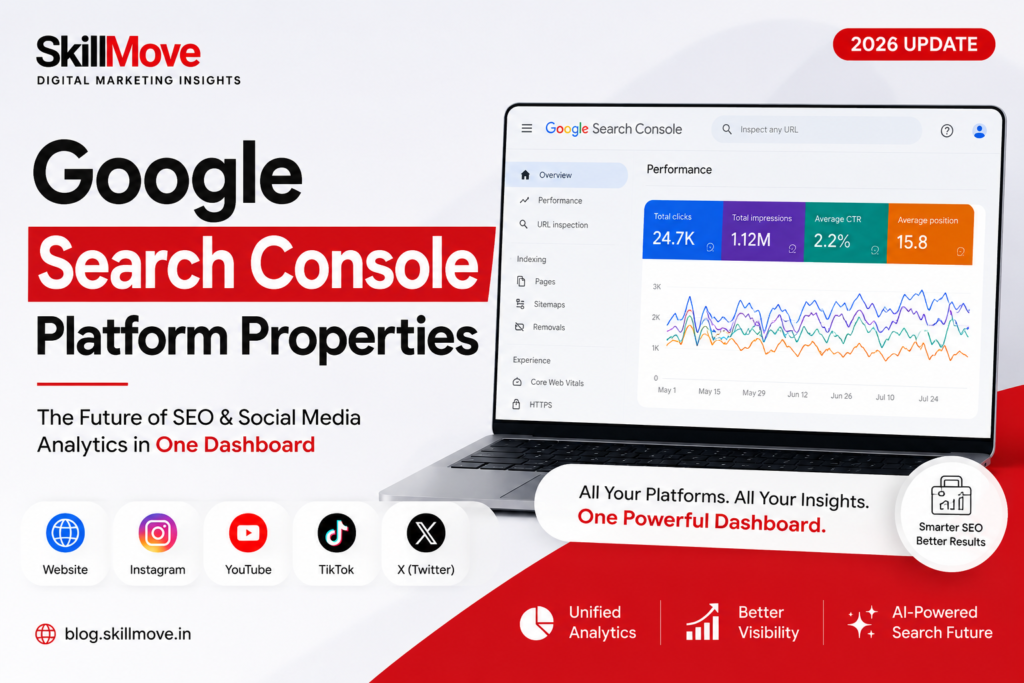
Google Search Console Platform Properties 2026 has quietly rewritten the rules of SEO. For almost twenty years it only measured websites clicks, impressions, keyword rankings, Core Web Vitals. In 2026, Google folded Instagram, YouTube, TikTok, and X directly into Search Console as brand-new “Platform Properties.” This means marketers can now see, inside the same dashboard, exactly which Google searches are surfacing their Reels, Shorts, and videos not just their web pages. This blog walks through what changed, why it matters, and a real step-by-step setup using SkillMove’s own Instagram and YouTube accounts, so you can connect your own social platforms to Search Console today.
“Search is no longer just about websites. It is now about your complete digital presence.” — This single shift is why Platform Properties may be the biggest Search Console update since Domain Properties.
Table of Contents
- Introduction
- What are Google Search Console Platform Properties?
- Why Did Google Launch Platform Properties?
- How Platform Properties Work
- Supported Platforms
- Traditional Website SEO vs Social SEO
- Step-by-Step Setup Guide
- Understanding Every Metric
- Website vs Social Platform Properties
- Benefits for SEO Professionals
- Social Media Analytics Inside Search Console
- Impact on Google AI Overviews
- Platform Properties for LLM SEO & Generative Search
- Future of SEO, GEO & OmniSearch
- Best Practices
- What This Means for SkillMove
- Conclusion
- Frequently Asked Questions
Introduction
Google Search Console Platform Properties 2026: Picture a typical SkillMove learner. A few years ago, they’d type “best digital marketing course in Hyderabad” into Google, land on a website, and maybe fill out a lead form. That’s the whole story SEO tools needed to track.
Today, that same learner starts their search the exact same way, but Google no longer sends them to a website first. It sends them to an Instagram Reel comparing AI marketing courses, a YouTube Short breaking down a Snowflake training roadmap, or a TikTok tutorial on Google Ads. The website is now just one stop on a much longer journey.
Google Search Console Platform Properties 2026 is Google’s answer to this shift. For the first time, you can add your Instagram, YouTube, TikTok, or X account as its own verified “property” inside Search Console with the same kind of impressions, clicks, CTR, and query-level reporting that website owners have relied on for two decades. This blog tells that story step by step, using real screenshots from setting this up live for SkillMove’s own social accounts.
Why Did Google Launch Platform Properties?
Five years ago, the search journey was simple:
- A user searches on Google
- Google shows website results
- The user lands on a website
Today, that journey has splintered across an entire ecosystem: Google Search Console Platform Properties 2026
- A user searches on Google
- Google surfaces Instagram Reels, YouTube videos, TikTok tutorials, X posts, Google Discover cards, AI-generated results, and websites all in the same results feed
People increasingly search directly for Reels, Shorts, and creator tutorials instead of blog posts. Google wants Search Console to measure every one of those touchpoints, not just the website, so that creators and brands can finally understand how their social content is being discovered through Google Search and Discovers not only through the Instagram or YouTube apps themselves.
What are Google Search Console Platform Properties?
Think of a Platform Property as a separate Search Console property for a social account, sitting right alongside your website property.
Instead of only being able to add something like https://skillmove.in, you can now add “Instagram” or “YouTube Channel” as an independent property. Each one gets its own dedicated Search Performance report. its own impressions, clicks, CTR, average position, and search queries completely separate from, but viewable next to, your website data.
Supported Platforms
| Platform | Supported |
|---|---|
| Yes | |
| YouTube | Yes |
| TikTok | Yes |
| X (Twitter) | Yes |
Google has started with these four platforms and is rolling the feature out broadly through 2026.
Traditional Website SEO vs Social SEO
The Old SEO Workflow
Website → Keywords → Ranking → Traffic → Conversions.
SEO used to begin and end on the website. Every metric, every optimization, every report was built around one domain.
The New SEO Workflow
Google Search Console Platform Properties 2026
Website + Instagram + YouTube + TikTok → Google Search → Discover → Traffic → Leads → Sales
Now the website is just one input among several. Instagram Reels and YouTube Shorts feed the same discovery engine, and Search Console is finally built to show how each one contributes.
Step-by-Step Setup Guide
Google Search Console Platform Properties 2026
Open the Property Switcher on Your Existing Website Property
Starting from the existing skillmove.in property inside Search Console, the property dropdown at the top-left was clicked to reveal every property already connected the main site, blog.skill move.in, and a couple of related domains.
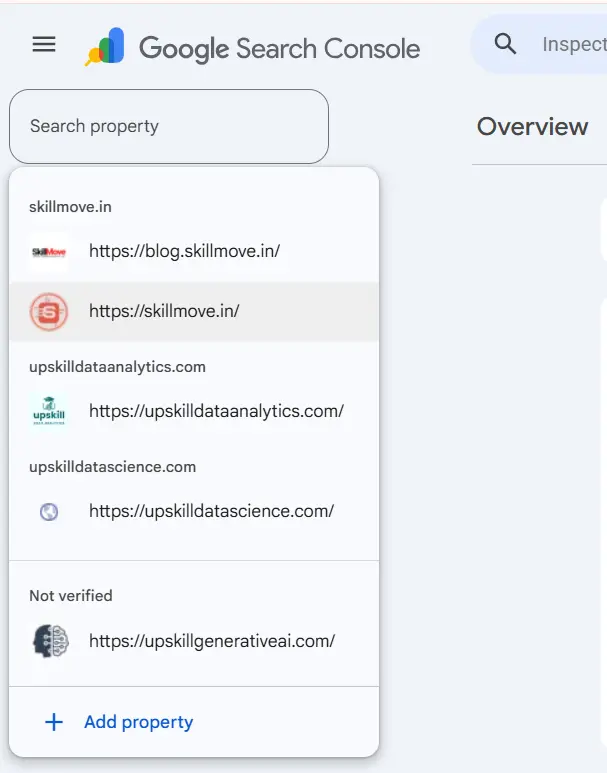
Step 2 – Click “Add Property” and Select a Property Type
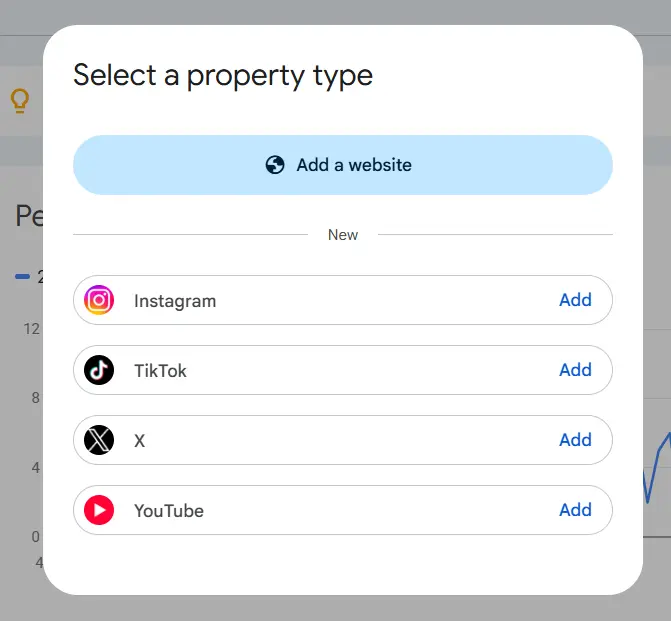
At the bottom of that same dropdown sits “Add property.” Clicking it opens a brand-new screen that didn’t exist in Search Console before 2026: “Select a property type.” Alongside the familiar “Add a website” option, there is now a clearly labelled “New” section listing Instagram, TikTok, X, and YouTube each with its own one-click “Add” button.
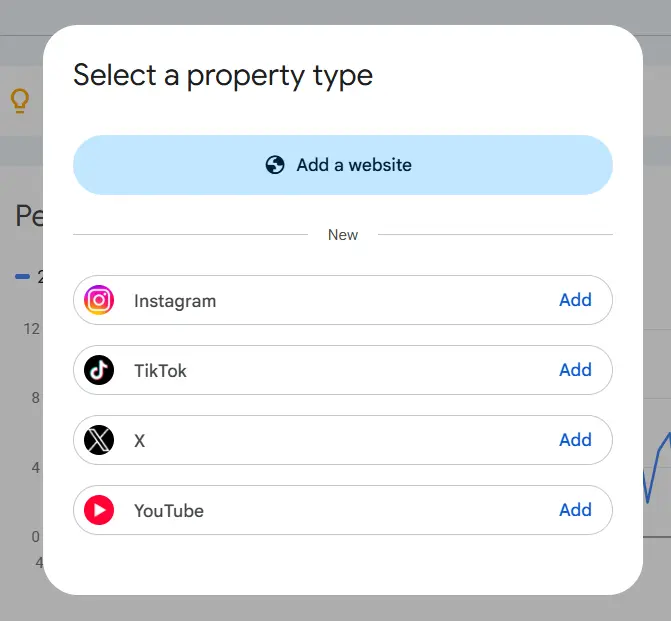
Step 3 – Choose Instagram and Grant Google Permission
Clicking “Add” next to Instagram triggers Google’s account-linking flow. A consent screen appears explaining that Search Console needs to verify account ownership by linking the Instagram account to a Google account, and shows exactly what Google will be able to access in this case, only basic profile information.
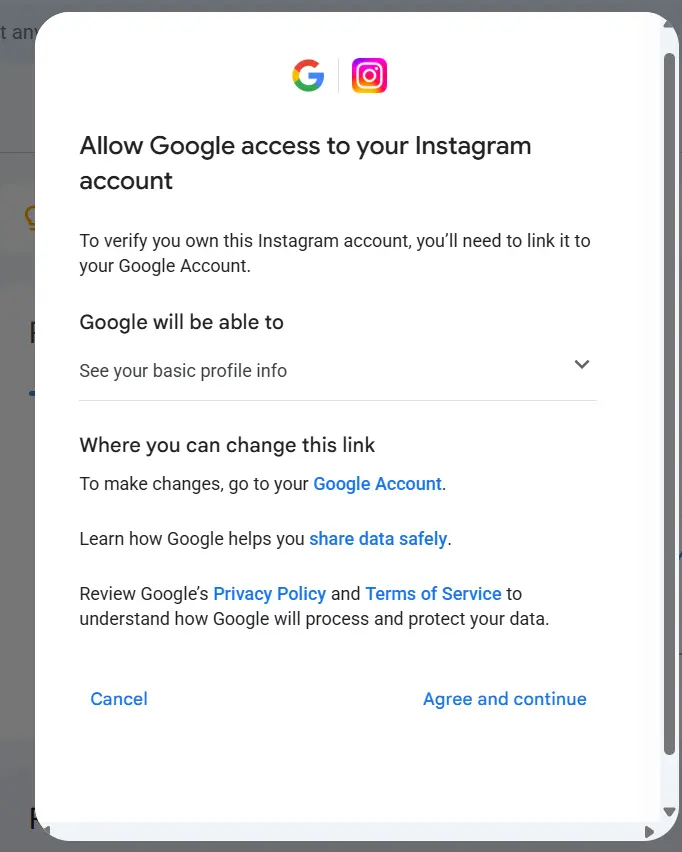
Step 4 – Grant Permissions
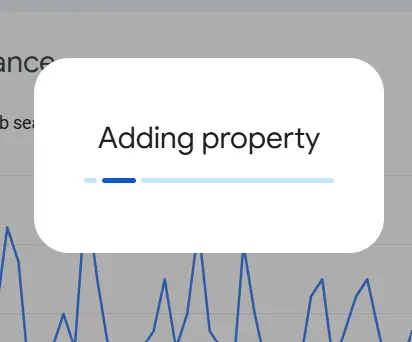
After clicking “Agree and continue,” Search Console shows a short loading state while it registers the new property in the background.
Step 5 – Property Added Successfully
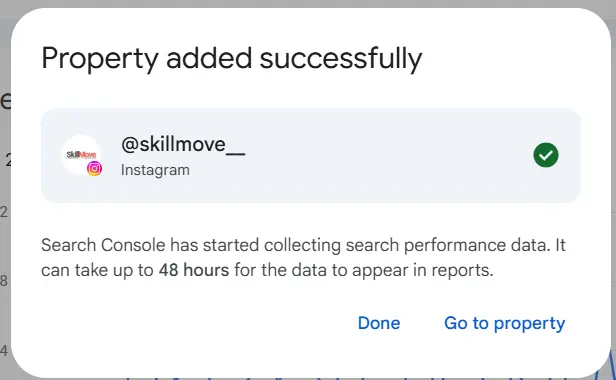
Within seconds, a confirmation screen appears: “Property added successfully,” showing the connected handle in this case, @skillmove__ clearly tagged as an Instagram property with a green checkmark. Google is upfront that data collection starts immediately, but reports can take up to 48 hours to populate.
Step – 6: Switch Freely Between Website and Social Properties
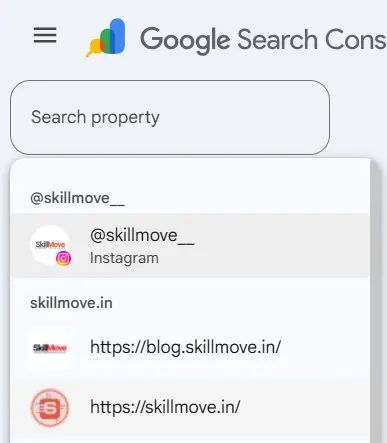
Opening the property switcher again now shows @skillmove__ (Instagram) sitting right at the top, above the existing skillmove.in website properties all searchable from the same box, all one click away from each other.
Step 7: Repeat the Process for YouTube
The same “Add property” flow was repeated from the website property list, this time choosing YouTube from the “Select a property type” modal.
Step 8: Select the Correct YouTube Channel
Because the linked Google account manages more than one channel, Search Console prompts a channel picker. Here it showed two options tied to the same LN Teks group: @SkillMove-Trainings and the sister-company channel @LNTeks. Selecting the correct brand channel at this step matters picking the wrong one would connect search performance data to the wrong entity entirely.
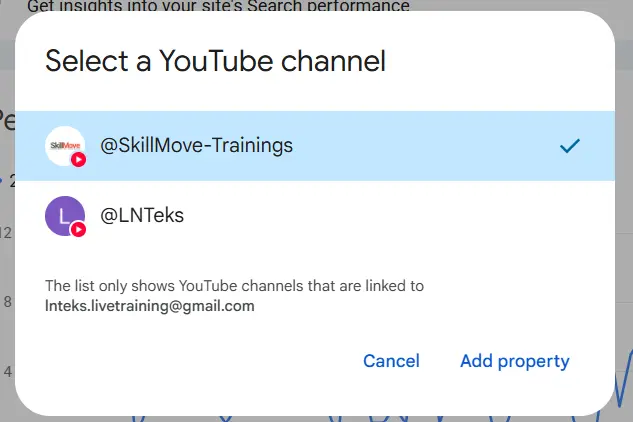
Step 9: Confirmation for YouTube
As with Instagram, a final confirmation screen appears, this time verifying @SkillMove-Trainings as a YouTube property, with the same note that reports may take up to 48 hours to populate.
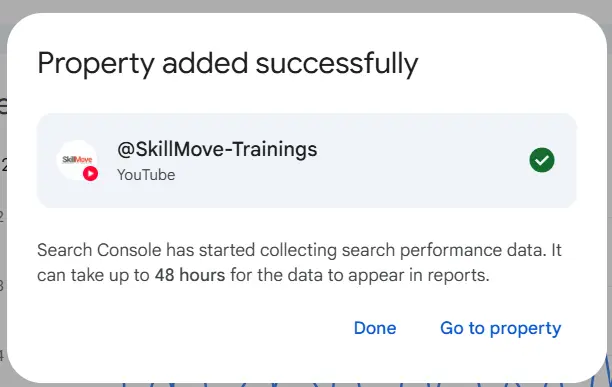
At the end of this nine-step process, one Search Console account now reports on a website, an Instagram account, and a YouTube channel all through the same familiar Performance, Queries, and CTR reports marketers already know how to read.
Understanding Every Metric
This is where Google Search Console Platform Properties 2026 genuinely change day-to-day marketing decisions, because the metrics map directly onto the ones marketers already trust from website SEO.
1. Impressions
How many times a piece of social content appeared in Google Search results. If an Instagram Reel shows up when someone searches “AI digital marketing course,” that counts as one impression even if they never tap it.
2. Clicks
The number of times someone actually clicked through to the Instagram post, Reel, or YouTube video directly from a Google Search result page.
3. CTR (Click-Through Rate)
CTR = Clicks ÷ Impressions × 100. For example, 10,000 impressions with 500 clicks works out to a 5% CTR the same formula marketers already use for website pages, now applied to social content.
4. Average Position
The average ranking position of a piece of social content within Google Search results, just like average position for a web page.
5. Search Queries
Arguably the most valuable report of all. This reveals the actual phrases people typed before your Reel, Short, or video appeared things like “AI marketing course,” “Snowflake training Hyderabad,” “best SEO institute,” “digital marketing jobs,” or “Python full stack.” It shows exactly what your audience is searching for before they ever land on your content.
Top Content
Google Search Console Platform Properties 2026: A ranked list of which Reels, Shorts, or videos are earning the most search visibility the social equivalent of a “top pages” report.
Website Search Console vs Social Platform Properties
| Website | Social |
|---|---|
| Pages | Posts |
| URLs | Reels |
| Blog Articles | Shorts |
| Products | Videos |
| Technical SEO | Social SEO |
| Sitemap | Platform Verification |
| Core Web Vitals | Engagement through Search |
| Crawl Errors | Platform Visibility |
Benefits for SEO Professionals
Google Search Console Platform Properties 2026: This is the biggest opportunity Platform Properties create. Suppose Search Console reports that a single Instagram Reel titled “AI SEO Tips” earned 25,000 impressions in Google Search. Instead of treating that as a one-off social win, it becomes a content brief:
- Turn the Reel’s script into a full blog post
- Record a matching YouTube video on the same topic
- Publish a companion LinkedIn article
- Build a dedicated landing page around the exact search queries that drove impressions
- Add internal links between all of these assets
- Layer in remarketing ads to the audience that already engaged
One successful topic, validated by real Google Search data, becomes a coordinated content push across every channel a brand runs instead of six teams guessing independently at what might work.
A Simple Cross-Platform SEO Framework
Google Search Console Platform Properties 2026:
Google Search → Instagram → YouTube → Website → Email Capture → CRM → Sales
This is the practical shift underway across digital marketing in 2026: moving from channel-specific campaigns run in isolation to a single, unified, search-driven growth funnel.
Challenges Marketers Will Face
Google Search Console Platform Properties 2026: Platform Properties are powerful, but they are not a full replacement for native analytics. They measure only how content performs inside Google Search and eligible surfaces like Discover — not how it performs inside the Instagram or YouTube apps themselves. Instagram Insights and YouTube Studio are still essential for watch time, likes, shares, comments, follower growth, and audience retention.
Current limitations to keep in mind:
- No follower analytics
- No likes or comments
- No watch time
- No audience retention
- No revenue metrics
- Search visibility only
What Should You Track Together?
| Google Search Console | Instagram Insights | YouTube Studio |
|---|---|---|
| Impressions in Google Search | Reach | Impressions |
| Clicks from Search | Profile Visits | Views |
| Search Queries | Follower Growth | Traffic Sources |
| CTR | Engagement Rate | Watch Time |
| Average Position | Saves | Subscribers |
Google Search Console Platform Properties 2026: Used together, these three sources finally give marketers a complete picture — discovery through Search Console, engagement through native platform insights, and conversion through the website and CRM.
Why This Changes SEO Forever
Google Search Console Platform Properties 2026: SEO is evolving from optimizing only web pages to optimizing every searchable asset a brand owns — websites, videos, Reels, creator profiles, and social posts. As Google continues blending traditional search, Discover, and AI-powered results into one feed, brands that build integrated content ecosystems across all of these formats will simply be easier to find.
Best Practices for Getting Started
- Connect your website, Instagram, and YouTube properties in Search Console this week — verification through account linking takes minutes.
- Wait the full 48 hours before judging early data; reports need time to populate.
- Check the Search Queries report on each social property monthly to catch new keyword opportunities before competitors do.
- Whenever a Reel or Short shows strong impressions, repurpose it into a blog post, video, and landing page within the same week.
- Keep using Instagram Insights and YouTube Studio in parallel — Search Console tells you discovery, not engagement or revenue.
- If multiple channels are linked to one Google account, double-check you’re selecting the correct brand channel, not a sister brand’s.
Conclusion: What This Means for SkillMove
Google Search Console Platform Properties 2026 mark one of the most significant shifts in digital marketing since Search Console itself introduced Domain Properties. For the first time, a training institute like SkillMove can measure how its Instagram Reels and YouTube videos are discovered through Google Search right alongside skillmove.in instead of treating website SEO and social content as two disconnected disciplines.
For SkillMove specifically, this closes a real gap in the funnel. Learners searching for “AI marketing course Hyderabad,” “Snowflake training,” or “digital marketing jobs” are just as likely to first encounter SkillMove through a Reel on @skillmove__ or a video on @SkillMove-Trainings as through the website itself. With Platform Properties connected, every one of those discovery moments is now visible in one dashboard the exact queries, the exact content, and the exact click-through performance.
Google Search Console Platform Properties 2026: That data becomes actionable training content strategy: the Search Queries report shows precisely which course topics and cities are generating real search demand, the Top Content report shows which Reels and Shorts are already working, and that intelligence can directly shape which courses SkillMove promotes next, which cities to target, and which formats Reel, Short, blog, or landing page deserve the next content push. Paired with SkillMove’s recruiter-built positioning “Built by Recruiters. Backed by Placements.” this unified search visibility helps make sure the right learners find SkillMove’s AI-native, placement-driven training programs at the exact moment they’re searching for them, on whichever platform they happen to be searching from.
Google Search Console Platform Properties FAQs
Find answers to the most common questions about Google Search Console Platform Properties, supported platforms, verification, analytics, and how this update is shaping the future of SEO.
What are Google Search Console Platform Properties?
Which platforms are currently supported?
How does verification work?
How long does data take to appear?
Does this replace Instagram Insights or YouTube Studio?
Can I connect multiple accounts?
What is the biggest benefit for SkillMove learners and marketers?