
Instagram Tagged Posts on Profile Grid: Everything Creators Need to Know


Quick Summary
Instagram Tagged Posts Profile Grid now lets users add posts they are tagged in directly to their own profile grid. A new “Add to grid” option allows a tagged post to appear on your profile, marked with a small tag icon. This update makes it easier for creators, brands, and users to showcase collaborations, user-generated content, and featured posts without creating a new post themselves.
What Is the Instagram Tagged Posts Grid Update?
Instagram Tagged Posts on Profile Grid – Picture this: you’re tagged in a friend’s travel reel, a brand collaboration post, or a group photo from a team event. Until now, that post lived only on the original creator’s grid even though you were part of it. From September 2026, Instagram is changing that story.
Instagram Tagged Posts Profile Grid has confirmed that users can now add posts they are tagged in straight to their own profile grid, right from the post itself. It’s a small tap, but it changes how collaboration, community, and visibility work across the platform. For creators, marketers, and brands who live and breathe Instagram growth, this update is worth understanding in detail.
What Is the Instagram Tagged Posts Grid Update?
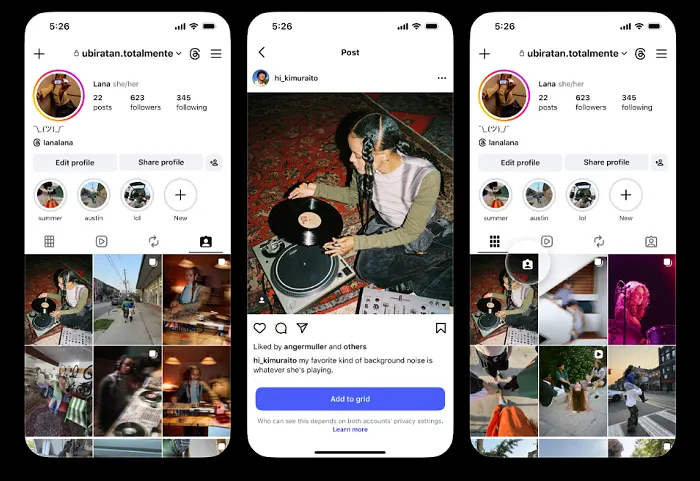
Instagram Tagged Posts Profile Grid: When someone tags you in a post, Instagram now shows you a new “Add to grid” option directly on that post. Tap it, and the post appears on your own profile grid alongside your regular uploads complete with a small tag icon in the top corner of the thumbnail, so followers know it’s a tagged, collaborative post rather than something you originally shared.
This builds on a series of collaboration-focused features Instagram has rolled out over the past few years, including:
- Post Collaborators — letting up to three accounts co-author a single post or reel
- Collaborative Stories — group Stories that multiple people can add to
- Remix — the ability to build on publicly shared photos and videos
The tagged-posts grid feature fits neatly into that pattern: it’s about making it easier for people to showcase how they’re connected to other accounts, without needing to create new content from scratch.
How to Add a Tagged Post to Your Profile Grid (Step-by-Step)
Instagram Tagged Posts Profile Grid:
- Open a post or reel where you have been tagged by another account.
- Look for the new “Add to grid” option shown on that post.
- Tap it to confirm you want the post to appear on your profile.
- The post now shows up on your grid with a small tag icon in the top-right corner of the thumbnail.
- Remove it from your grid at any time if you change your mind it stays on the original poster’s grid regardless.
Why Did Instagram Launch This Update Now?
Instagram Tagged Posts Profile Grid: This update is about protecting Instagram’s identity as a social, community-driven app not just a video-entertainment feed. According to reporting from Social Media Today, around 50% of all time spent on Instagram is now dedicated to Reels consumption, and most of Instagram and Facebook’s recent engagement growth has come from Reels specifically.
That trend is good for watch time, but it carries a risk: if Instagram becomes known purely for video entertainment, it ends up competing head-to-head with YouTube, TikTok, and Netflix on their own turf. Community features tagging, collaboration, and shared posts are what keep Instagram feeling like a place to connect with real people, not just scroll past content.
What This Means for Creators, Brands, and Marketers
Instagram Tagged Posts Profile Grid:
This update opens up a genuinely useful, low-effort growth lever. Here’s what it means in practice:
| Audience | What Changes For You |
| Creators | Every brand or influencer collaboration you’re tagged in can now live permanently on your own grid, not just theirs doubling the visible reach of each collab. |
| Small Businesses | Customer tags, event features, and partner shoutouts can be pulled onto your business grid, building instant social proof without new content spend. |
| Marketing Teams | Influencer campaigns now generate two owned assets per post instead of one, improving the ROI of every paid or gifted collaboration. |
| Personal Brands | Group event photos, panel appearances, and community tags become a curated, credibility-building part of your profile. |
SkillMove’s Take: Turning This Update Into a Growth Strategy
At SkillMove, our AI Digital Marketing trainers see updates like this as free real estate for brand building. A tagged post added to your grid is essentially a second placement for the same piece of content and smart marketers should treat every collaboration, guest feature, or customer tag as an asset to claim, not just a mention to acknowledge.
- Audit your tagged posts weekly and add relevant, on-brand ones to your grid.
- Ask collaborators to tag your business account specifically so tagged posts are easy to find and add.
- Use tagged posts strategically to fill gaps between your own scheduled content.
- Track which added tagged posts drive the most profile visits using Instagram Insights.
Conclusion
The Instagram tagged posts profile grid update looks small on the surface, but it reflects a bigger shift: Instagram is doubling down on community and collaboration to stay different from pure video platforms. For creators, businesses, and marketers, it’s a simple, no-cost way to extend the life and reach of every collaboration you’re part of. The accounts that adapt fastest to features like this are usually the ones that grow fastest too.
Frequently Asked Questions
Frequently Asked Questions
What is the Instagram tagged posts profile grid update?
It’s a September 2026 Instagram feature that lets users add a post they’re tagged in to their own profile grid using the new “Add to grid” option shown directly on the post.
How do I add a tagged post to my Instagram grid?
Open the post you’re tagged in, tap “Add to grid”, and confirm the action. The post will then appear on your profile with a small tag icon marking it as a tagged post.
Will the tagged post still appear on the original poster’s grid too?
Yes. Adding a tagged post to your own grid does not remove it from the original creator’s profile. It simply allows the same post to appear on your profile as well.
Can I remove a tagged post from my grid later?
Yes. You can remove a tagged post from your own profile grid at any time. Removing it from your grid does not affect the original post.
Is this feature available to all Instagram users?
Instagram has rolled out the feature broadly as part of its ongoing collaboration-focused updates. However, availability may vary by region, account type, and rollout stage.
How is this different from Instagram’s Collaborator feature?
Instagram’s Collaborator feature lets multiple accounts co-author a post or Reel before it is published. The tagged-post grid feature works differently because it lets you add an existing post you were tagged in to your own grid after it has already been published.
Why did Instagram launch this tagged posts feature?
The update supports Instagram’s focus on community, collaboration, and connections between users. It gives people another way to showcase content they are part of rather than limiting profile grids to posts they published themselves.
How can brands use this update for marketing?
Brands can add relevant influencer collaborations, customer posts, event features, and partner content to their profile grid. This can strengthen social proof, showcase partnerships, and make the brand profile more community-focused.
Does adding a tagged post to my grid count as a new post for the algorithm?
Instagram has not stated that added tagged posts are ranked exactly like original uploads. It is better to treat the feature as a profile visibility and curation tool rather than a replacement for creating fresh content.
Where can I learn more about using Instagram updates for business growth?
SkillMove’s AI Digital Marketing course covers real-time platform updates, social media marketing, AI-powered content tools, paid advertising, analytics, and practical strategies for using changing digital platforms for business growth.
Learn Ai Skills from SkillMove
SkillMove is a Hyderabad-based digital marketing and AI training institute built for people who want to actually keep up with a platform landscape that changes every week not study it from outdated slides. Our AI Digital Marketing Program is built around live case studies like this Instagram update, so learners understand not just “what changed” but “what to do about it.”
- Live, current-affairs style teaching on real platform updates from Instagram, Meta, and Google
- Hands-on modules covering organic growth, paid ads, AI content tools, and analytics
- Placement support and portfolio-building for every learner
Whether you’re a student, a working professional, or a business owner managing your own social channels, SkillMove’s training helps you turn platform news into practical growth strategy the same way this article just did.